David Stoyka — AI Solutions & Automation

Turning Real Business Problems Into Working AI-Powered Solutions

I combine decades of business, sales, digital publishing, and technology experience with hands-on AI development to solve real operational problems. At CarCollectorsClub.com, I designed and built working applications, automation workflows, data pipelines, API integrations, AI research systems, and publishing tools used in day-to-day operations.

The projects below show how I identify a business need, design the solution, connect the right data and technologies, automate the work where it adds value, and put the result into production.

  • AI Solutions
  • AI Agents
  • Automation
  • Application Development
  • Data Engineering
  • APIs & Webhooks
  • Data Pipelines & Synchronization
  • Workflow Orchestration
  • Systems Integration
  • Web Scraping & Extraction
  • Publishing Automation
  • Business Process Design

The Business Challenge

The Current Publishing Process Is Manual, Repetitive, Time-Consuming, and Costly.

Managing hundreds of collector-car events, auctions, venues, organizers, articles, dates, images, and social posts required constant research, checking, data entry, and updates across several systems. Staff had to repeatedly search for new events, verify changing dates, maintain Google Sheets, update WordPress, reconcile venue and organizer records, and track publishing status by hand.

As the operation grew, the process became increasingly repetitive, difficult to monitor, and prone to delays, duplicate work, and data inconsistencies.

The challenge was not simply creating content. It was keeping research, data, publishing, and multiple connected systems accurate, synchronized, and scalable.
The Solution

A User-Friendly Publishing Dashboard That Automates the Entire Process End to End

Instead of managing each publishing task manually, I designed a dashboard that brings the entire process into one place. With a click, the system can discover new events, verify dates, update existing records, validate venues and organizers, create AI-generated articles, publish to WordPress, synchronize event data, and distribute approved posts to social channels.

The dashboard also tracks event status, publishing progress, IDs, dates, and workflow results so the operator can see what is complete, what needs attention, and launch the next action without moving between multiple systems.

The result is a practical production system that reduces repetitive work, improves data consistency, speeds publishing, and gives the business a more scalable way to manage its event and auction operations.

01 · CCC Publisher Dashboard

A Custom Dashboard That Cuts 30+ Hours of Manual Work to Less Than One Hour

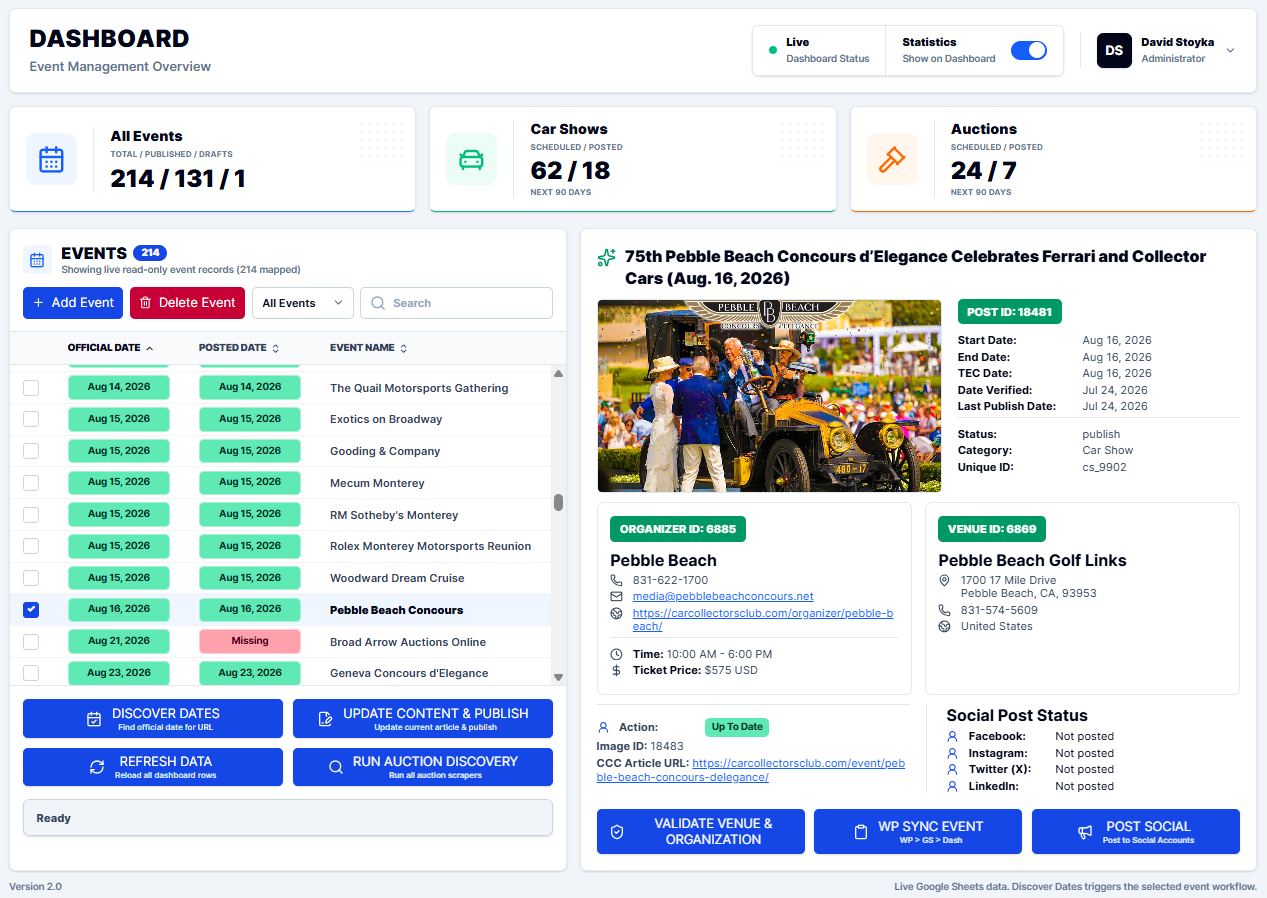
CarCollectorsClub.com manages hundreds of collector-car events, auctions, venues, organizers, articles, dates, images, and publishing tasks. I designed the CCC Publisher Dashboard to bring those operations into one visual control center instead of managing them across disconnected tools and manual processes.

The dashboard gives the operator a live view of event data, publishing status, venue and organizer information, WordPress IDs, dates, social-post status, and workflow results. From the same interface, the user can launch AI-assisted and automated workflows that research, validate, update, publish, synchronize, and distribute event information.

Live CCC publisher dashboard showing car show content controls
CCC Publisher Dashboard — live operational view of event, auction, venue, publishing, and workflow data.

One-Click Controls for Complex Workflows

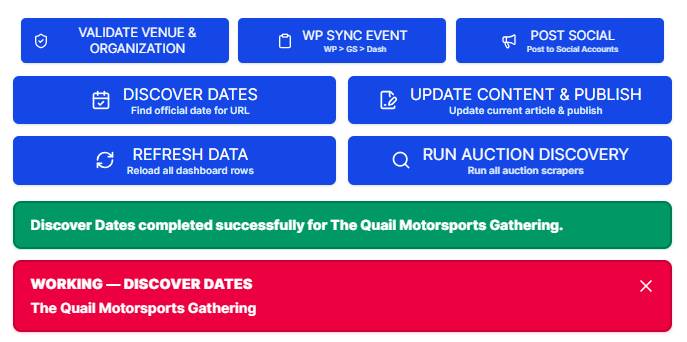
CCC dashboard action buttons with workflow status feedback
Workflow controls and operator feedback

Easy One-Click Workflow Automation

Each dashboard button launches a specific automated workflow, allowing the operator to research dates, update and publish content, validate venues and organizers, synchronize WordPress data, distribute social content, refresh records, or run auction discovery — all from one simple interface.

Structured inputs for a new event workflow

Add a New Event in One Simple Step

The Add Event form captures the key information needed to start the process. From there, AI-assisted workflows can research the event, match venues and organizers, enrich the data, create the required records, and move the event into the publishing workflow.

Dashboard Statistics at a Glance

Dashboard statistics showing event, car show, and auction publishing status with the statistics visibility toggle

What’s Published — and What’s Next

The dashboard provides an instant view of the publishing workload: total events in the database, published records, drafts still needing attention, and 90-day scheduled-versus-published counts for both car shows and auctions.

Instead of manually reviewing hundreds of records to decide what needs attention next, the Dashboard makes the publishing priorities visible at a glance.

The statistics panel can also be shown or hidden to free up workspace when the operator wants to focus on individual event records.

02 · Behind the Dashboard

From One Button Click to a Fully Synchronized Content Update

The dashboard is only the control surface. Behind each action is a connected workflow that moves data across the systems required to complete the job.

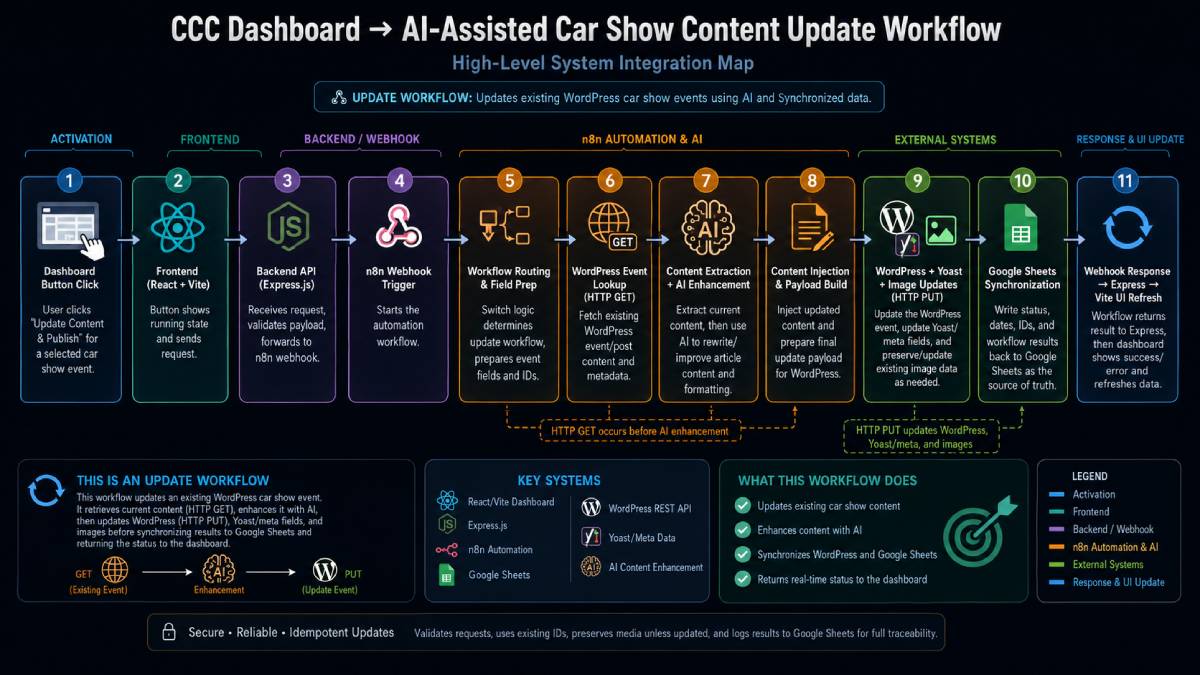
When the operator selects an existing car show and clicks Update Content & Publish, the dashboard sends the request into the backend automation layer. The workflow retrieves the current event and article data, uses AI where needed to improve and format the content, prepares the updated publishing payload, synchronizes the changes with WordPress and Google Sheets, and returns the result to the dashboard.

The entire process is designed to keep the event record, article content, WordPress data, IDs, metadata, images, and operating data synchronized without requiring the user to manually move between systems.

Architecture diagram of the AI-assisted car show content update workflow
High-level system integration map showing how a dashboard action moves through the application, automation, AI, API, publishing, synchronization, and response layers.
  1. Dashboard Action
  2. Backend Request
  3. n8n Automation
  4. WordPress Lookup
  5. AI Content Processing
  6. Data Cleaning & Payload Build
  7. WordPress Update
  8. Google Sheets Synchronization
  9. Dashboard Response

How the systems work together

One Workflow Keeps Content, Data, and Publishing Systems in Sync

The workflow combines application logic, webhook-driven automation, AI-assisted content processing, REST/API requests, WordPress publishing, and source-of-truth data synchronization. Existing records are retrieved before updates are made, allowing the system to work with the current article, event, venue, organizer, metadata, and image information rather than rebuilding the record from scratch.

This approach keeps the user experience simple while allowing a much more sophisticated process to run behind the interface.

API-Driven Integration

Uses HTTP GET, POST, and PUT requests to move and update information across connected systems.

AI-Assisted Content Processing

Uses AI to rewrite, format, and improve event content where needed.

Synchronized Data

Keeps Google Sheets and WordPress publishing data aligned as the workflow completes.

Closed-Loop Feedback

Returns workflow results back through the backend so the dashboard can show completion and refresh current data.

03 · Workflow Orchestration

Six Specialized AI Workflows Automate the Publishing Process from Research to Distribution

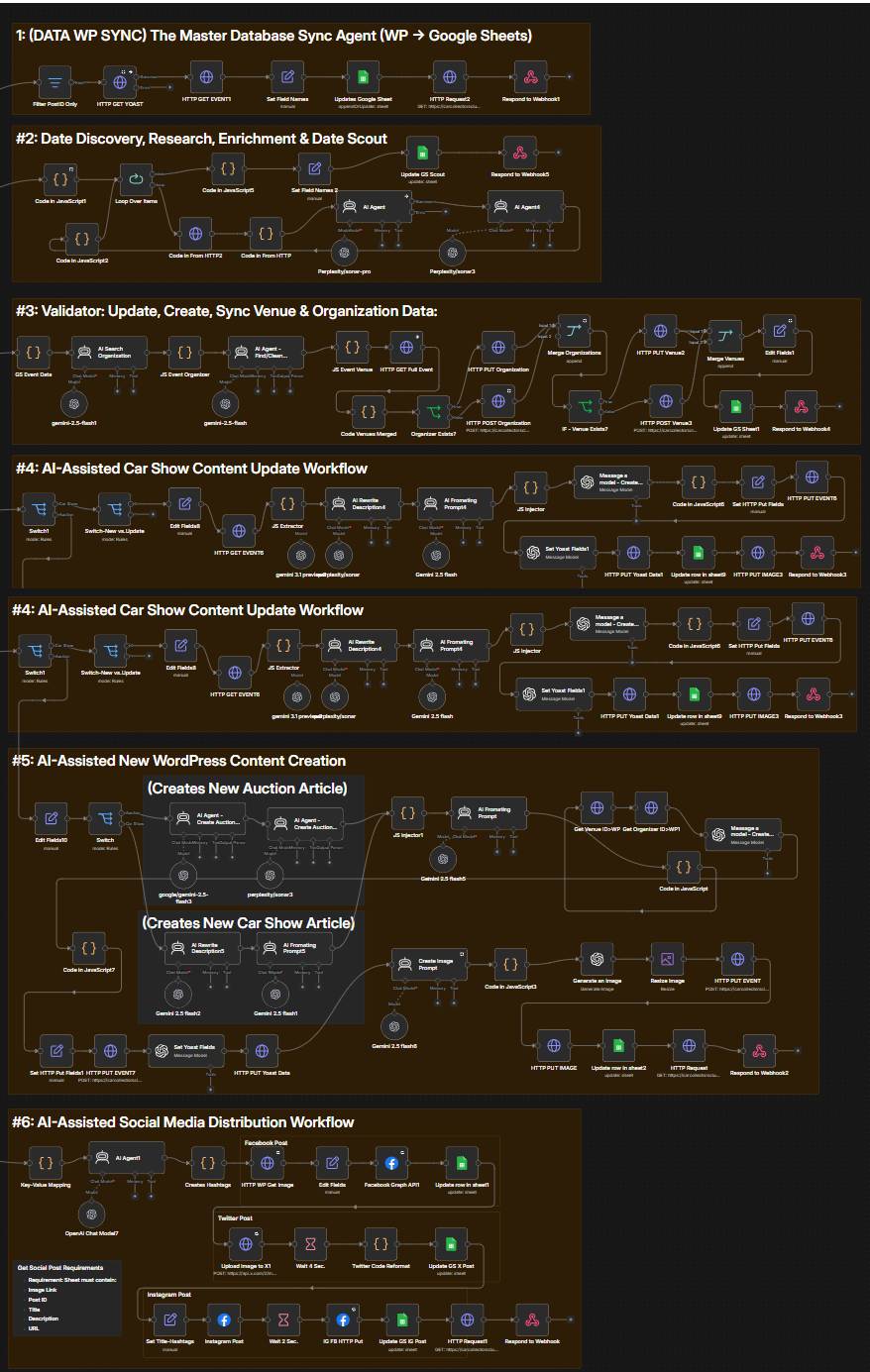
The CCC automation environment is made up of specialized workflows that handle different parts of the publishing and data lifecycle. Each workflow performs a specific job — research, validation, content creation, synchronization, publishing, or distribution — while sharing the same connected operating model. Structured inputs, automated decision logic, AI-assisted processing, API communication, and data synchronization allow each workflow to do far more than a single manual task.

Together, these workflows turn what were once separate manual tasks into a connected operating system.

Overview of the complete n8n workflow library
Complete CCC automation environment showing the connected workflow architecture used for research, validation, publishing, synchronization, and distribution.
01

Master Database Sync (WP → Google Sheets)

Pull WordPress post and event records through API calls, normalize key fields, and write synchronized data back into Google Sheets so the operating sheet remains the current source of truth.

02

AI-Assisted Event Date Discovery, Research & Date Scout

Research upcoming event dates, verify source information with AI-assisted review, normalize the confirmed results into structured data, and synchronize the updated event information back into Google Sheets.

03

AI-Assisted Venue & Organizer Validation, Creation & Synchronization

Retrieve event data, verify venue and organizer records, use AI-assisted matching to identify the correct entities, create missing records when needed, prevent duplicates, and synchronize validated IDs and data across Google Sheets, WordPress, and The Events Calendar.

04

AI-Assisted Existing Car Show Content Update

Retrieve existing WordPress event and article data, use AI-assisted research and formatting to improve the content, prepare the required update payloads, update event, image, SEO, and publishing data through APIs, and synchronize the results back into the operating sheet.

05

AI-Assisted New WordPress Content Creation

Create new car show or auction content when no existing article record is present, using AI-assisted research, content generation, formatting, structured payload creation, WordPress and event publishing, image generation, and returned ID synchronization.

06

AI-Assisted Social Media Distribution

Transform approved event content into platform-specific social posts, generate supporting messaging and hashtags, publish through connected social APIs, and record distribution results back into Google Sheets.

One Connected Business System

Bringing the Dashboard and AI Agent Workflows Together

The dashboard provides the simple user-facing control layer, while specialized AI-agent workflows handle research, validation, AI content processing, API calls, WordPress / The Events Calendar publishing, Google Sheets synchronization, and response handling behind the scenes.

One dashboard action can launch a complex multi-step process without requiring the user to understand or manually operate each backend system. This reduces repetitive work, manual handoffs, duplicate data entry, and time spent moving between disconnected tools.

Across the broader publishing operation, work that previously required more than 30 hours of manual effort each week has been consolidated into a connected system where complex processes can be completed in minutes rather than hours.

See the Integration in Action

The video follows a single dashboard action through the complete backend process—from workflow orchestration and AI-assisted processing to API integrations, WordPress / The Events Calendar publishing, Google Sheets synchronization, and the completed response returning to the dashboard.

End-to-end demonstration of the dashboard and AI-agent workflow integration, showing how a single user action moves through orchestration, AI processing, APIs, publishing, data synchronization, and back to the dashboard.

04 · Automated discovery

Automated Auction Discovery Built for Repeatable, Structured Intelligence

The Problem

Collector-car auction schedules are spread across many websites with different layouts, date formats, naming conventions, and venue details. Manually reviewing those sites and preparing the information for publishing created a repetitive research process that was difficult to scale.

The Solution

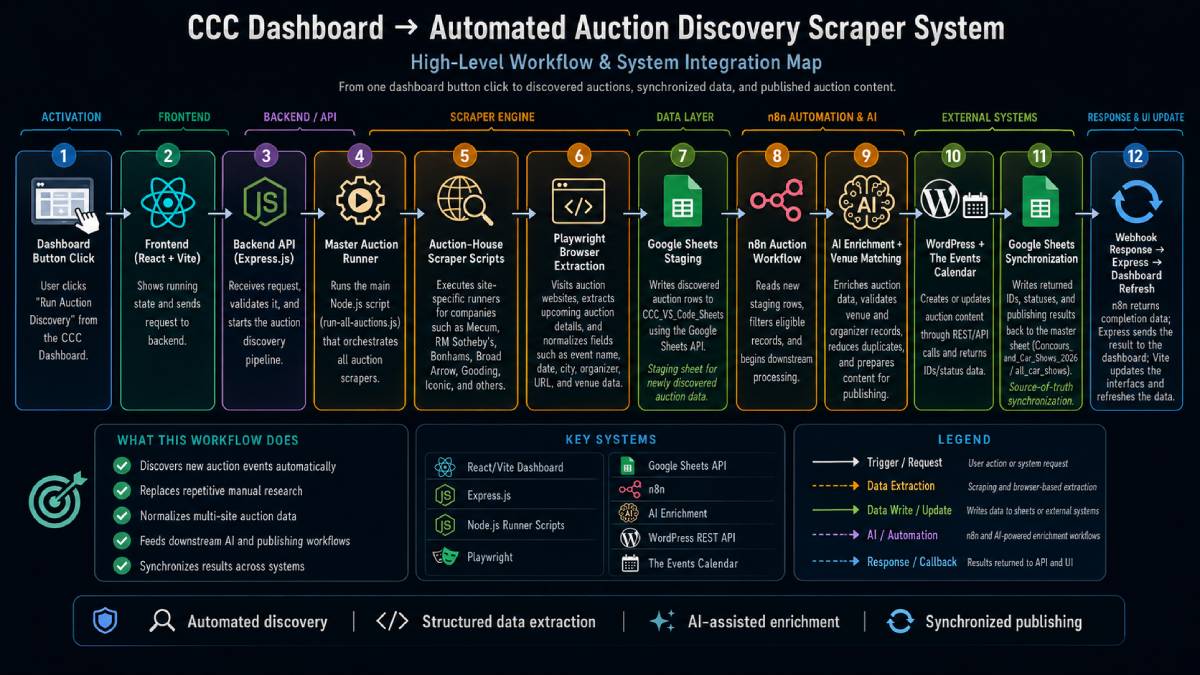
I designed a custom auction discovery system that runs site-specific scraper scripts, extracts upcoming auction data, normalizes the results into a consistent structure, and sends newly discovered records into the CCC data and publishing pipeline for validation, enrichment, synchronization, and publishing.

The goal was not simply to scrape webpages — it was to turn changing public auction information into structured, reusable business data.

Architecture diagram of the automated auction discovery scraper system
End-to-end auction discovery architecture showing how a dashboard action triggers scraper execution, structured extraction, data staging, AI-assisted enrichment, WordPress/TEC publishing, synchronization, and response handling.
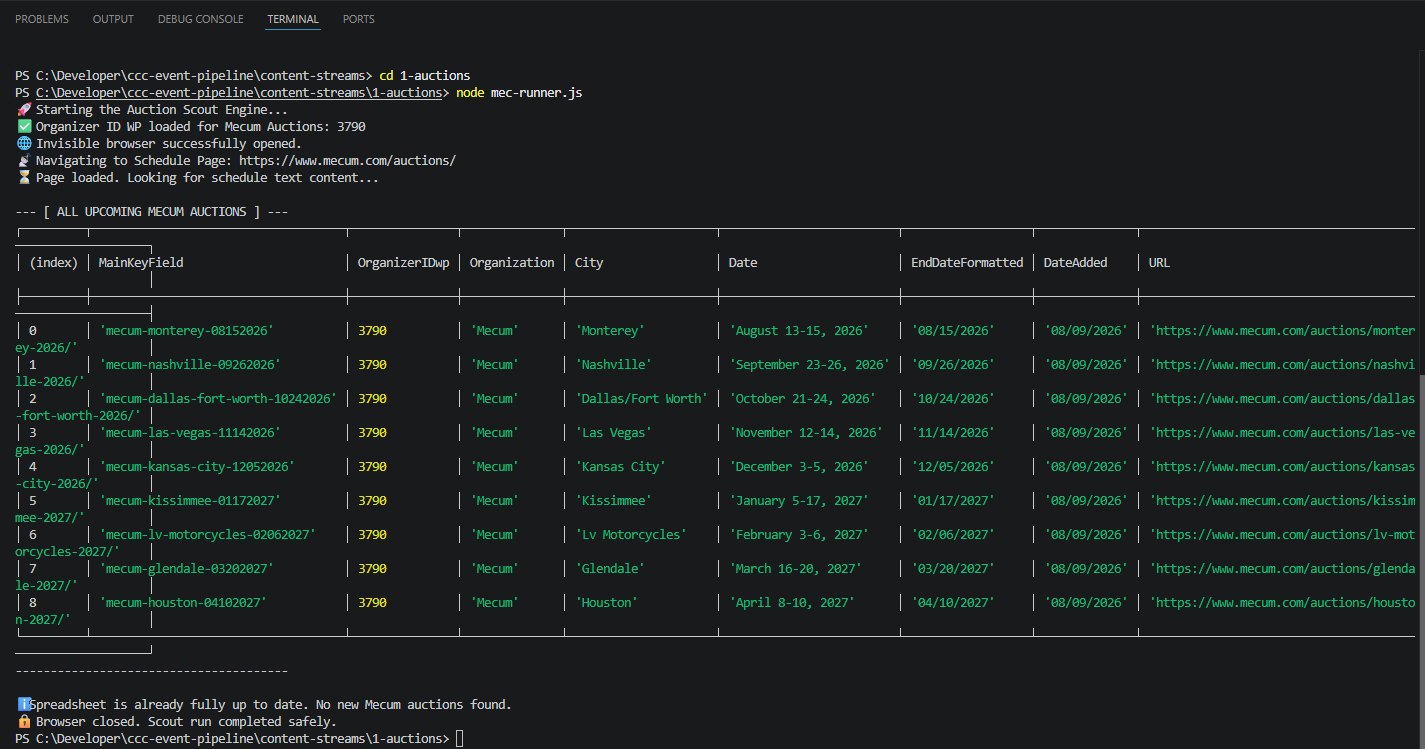
Terminal showing a Mecum auction scraper returning structured data
Mecum auction scraper running in VS Code — the Node.js runner visits the live auction schedule, extracts upcoming events, converts the results into structured fields, and checks the staging data before completing the run.

Working proof

From Live Auction Websites to Structured Event Data

Each site-specific runner visits the target auction website, identifies upcoming auction records, extracts the relevant event details, and converts them into a consistent data structure.

The Mecum example shown here returns structured fields such as auction name, city, date range, organizer ID, normalized end date, source URL, and record key before checking whether the staging data is already current.

The structured output is then available to the connected Google Sheets and n8n workflow layer for downstream validation, enrichment, publishing, and synchronization.

05 · Connected Data & Synchronization

From Hundreds of Manual Data Entries to One Simple Dashboard

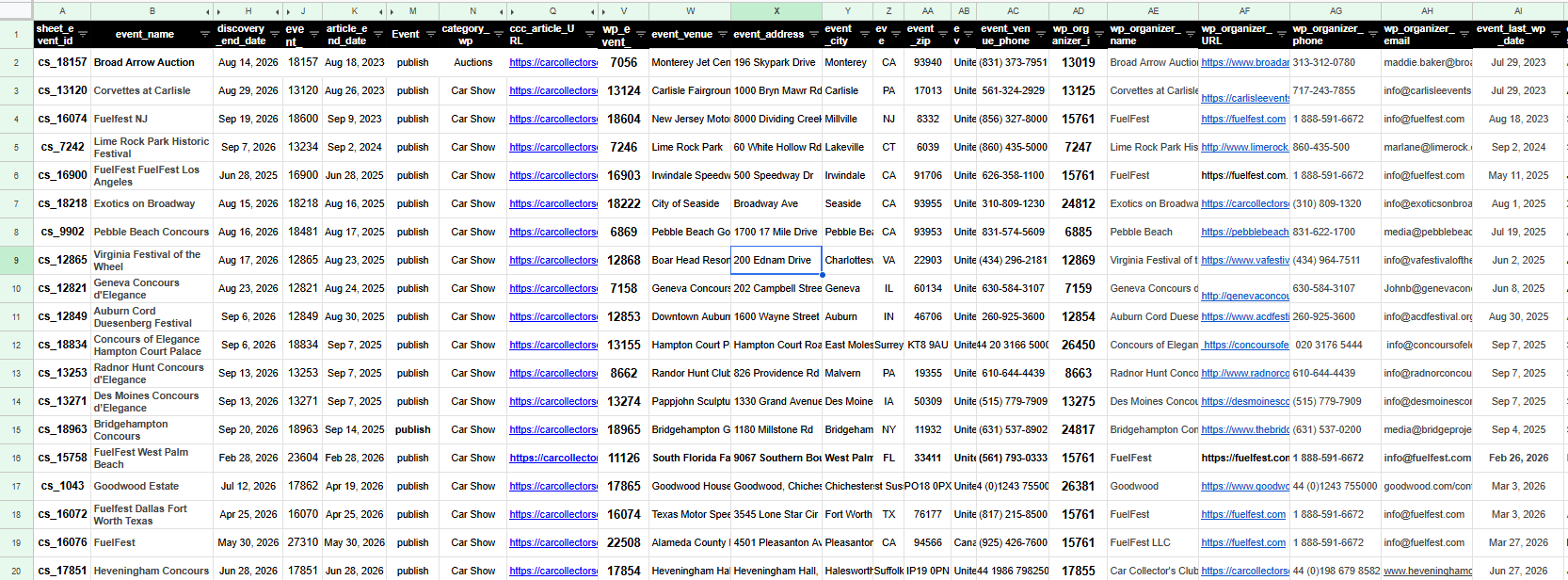
CarCollectorsClub.com relies on a structured Google Sheets database as the central operating source of truth for event, auction, venue, organizer, publishing, and workflow data.

That database connects the front-end dashboard with the automation, research, publishing, and synchronization processes running behind it.

Past: Manual Research and Data Maintenance

Event dates, venue details, organizer information, URLs, WordPress IDs, duplicate records, and publishing data had to be researched, checked, entered, and maintained manually across multiple systems.

Keeping the database current meant repeatedly searching websites, verifying upcoming dates, looking up venue addresses, reviewing records for errors or duplicates, and manually entering corrections.

Now: One Dashboard Bringing the Entire Workflow Together

The Dashboard, Google Sheets source of truth, n8n workflows, AI-assisted research, APIs, WordPress, The Events Calendar, and synchronization processes now work together as one connected operating system.

Information can be discovered, validated, enriched, updated, published, and written back into the operating data without manually moving between every system.

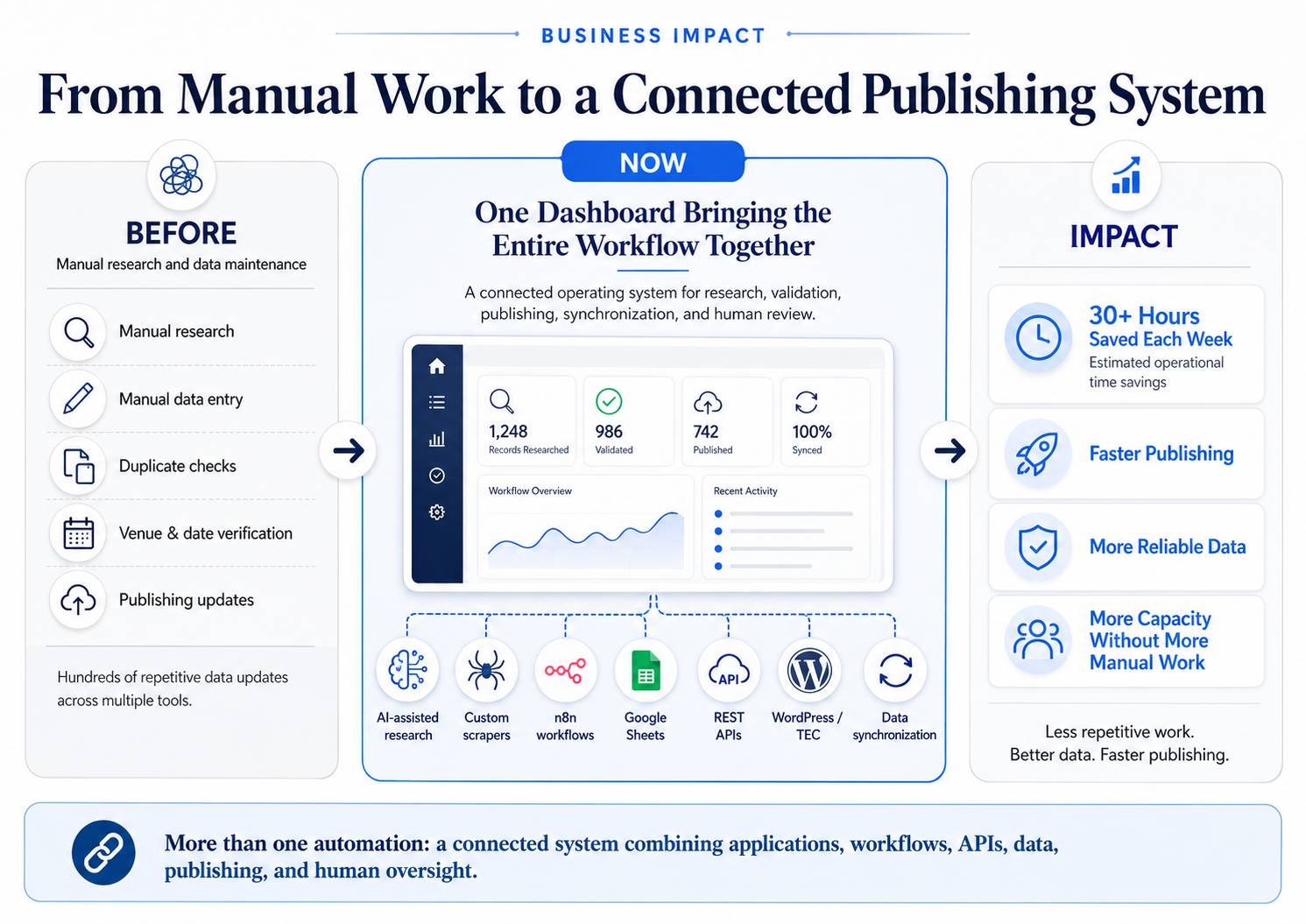
30+ Hours of Manual Work Saved Each Week

The connected workflow dramatically reduced repetitive research and data entry while improving consistency across event records, venue and organizer data, publishing IDs, dates, and downstream updates.

The result is faster publishing, fewer avoidable errors, better duplicate control, more reliable event data, and substantially less time spent maintaining records by hand.

Estimated operational time savings based on prior weekly manual research, verification, and data-entry workload.

One Connected Dashboard Replaces Hours of Manual Data Entry, Updates, and Verification

What once required hours of manual research, checking, and data entry is now handled through the Dashboard and automated workflows. Dates are researched, venues and organizers are validated, duplicates are identified, records are updated, and the results are synchronized across Google Sheets, WordPress, and The Events Calendar. What once required hours of manual research, checking, and data entry can now be handled with the click of a button.

Structured Google Sheets database used as the operational source of truth
CCC structured event database — the operational source of truth used to maintain event, auction, venue, organizer, publishing, and workflow data across the connected system.

How the Data Moves Through the System

The Dashboard and automated workflows use the same structured data to research, validate, update, publish, and synchronize information across the connected systems.

  1. Dashboard
  2. Google Sheets
  3. AI + n8n Workflows
  4. REST APIs & Webhooks
  5. WordPress + The Events Calendar
  6. Synchronized Results Back to Google Sheets

Data & Operating Records

Google Sheets · Google Sheets API · MySQL-Backed WordPress Data

Stores and exchanges the structured event, venue, organizer, publishing, and workflow data used by the connected system.

Integration & Communication

REST APIs · Webhooks · HTTP GET / POST / PUT

Moves information between the Dashboard, automation workflows, Google Sheets, WordPress, The Events Calendar, and other connected services.

Validation & Synchronization

Record Matching · WordPress / TEC Updates · Data Synchronization

Validates records, prevents mismatches and duplicates, updates the correct systems, and writes returned IDs, status, and publishing data back into the operating dataset.

Closed-loop data

Automatic Synchronization Keeps Every System Working from the Same Current Data

The value of the system is not simply that individual tasks are automated. The workflows also keep information aligned across the systems that depend on it.

Event records, venue and organizer IDs, publishing data, status information, and returned API results can be written back into the source-of-truth dataset so the next workflow starts with the most current information available.

This closed-loop synchronization reduces repeated data entry and helps prevent the different systems from drifting apart over time.

06 · Business Impact

30+ Hours Saved Each Week Through AI, Automation, and Connected Data

What started as a need to reduce repetitive research and data entry became a connected operating system for CarCollectorsClub.com.

The Dashboard now brings together AI-assisted research, custom scrapers, n8n workflows, Google Sheets, APIs, WordPress, The Events Calendar, and synchronized data into one working process.

Business impact summary showing the transition from manual work to a connected publishing system
Business impact summary — the CCC operating model evolved from repetitive manual research and data entry into a connected workflow built around one dashboard, synchronized data, automation, publishing, and human oversight.
30+ Hours

Saved Each Week

Manual research, verification, data entry, duplicate checking, and record maintenance were reduced dramatically through automation and dashboard-controlled workflows.

Estimated operational time savings based on prior weekly manual research, verification, and data-entry workload.

Faster

Publishing

Events and auctions can move from discovery and validation to publishing much faster, without repeatedly moving information between disconnected tools.

More Reliable

Data

Record matching, validation, structured updates, and synchronization help keep dates, venues, organizers, IDs, and publishing data more accurate and consistent.

More Capacity

Without More Manual Work

The system allows CarCollectorsClub.com to maintain and publish more event and auction information without increasing manual effort at the same rate.

The Real Value Comes From Connecting the Entire Process

The real value did not come from one AI tool, one scraper, or one workflow. It came from connecting the pieces into a practical system that supports the entire process — from research and data validation through publishing, synchronization, and human review.

The result: less repetitive work, better data, faster publishing, and more time available for higher-value business activities.

07 · Application Development

CarPics AI

AI Vehicle Identification, Collector Research & Virtual Garage

Through conversations and networking with collectors at car shows and concours events, I repeatedly recognized the same frustration: people were surrounded by interesting, rare, or valuable automobiles but did not always know exactly what they were seeing or where to find more information while standing in front of a vehicle.

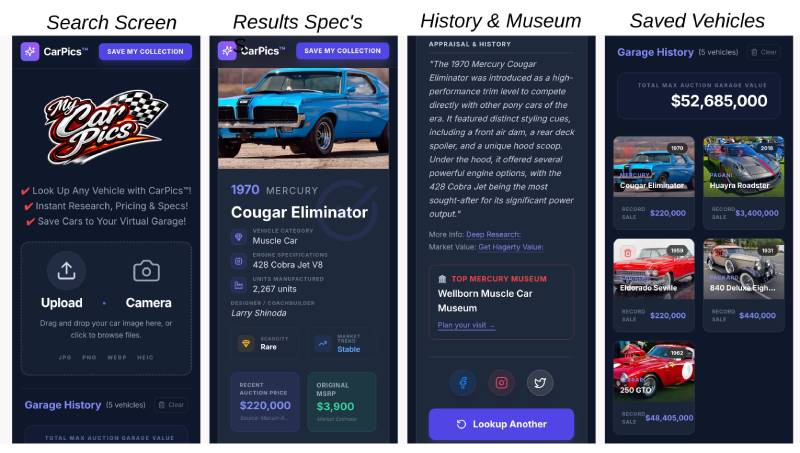
I designed and built CarPics, an AI-powered mobile web application that lets a user photograph or upload a vehicle to receive collector-oriented identification, specifications, production and rarity details, pricing and auction context, designer information, museum references, and deeper research. Identified vehicles can be saved in a persistent virtual garage for later reference.

Four CarPics application screens showing vehicle search, identification results and specifications, history and museum research, and saved vehicles
CarPics product experience — vehicle search, AI identification and specifications, history and museum research, and persistent saved vehicles in the virtual garage.

Built & Deployed With

  • React
  • TypeScript
  • Gemini
  • Google Search Grounding
  • Google Gen AI SDK
  • Node.js
  • Express
  • n8n
  • JavaScript
  • Google Sheets
  • IndexedDB / Dexie
  • Vercel
  • REST APIs

08 · Application Development

AI-Powered Interactive Map for Car Clubs & Tracks

Car enthusiasts often struggle to find nearby car clubs, racetracks, collector garages, storage facilities, and automotive museums because those destinations are scattered across many websites, directories, and disconnected sources.

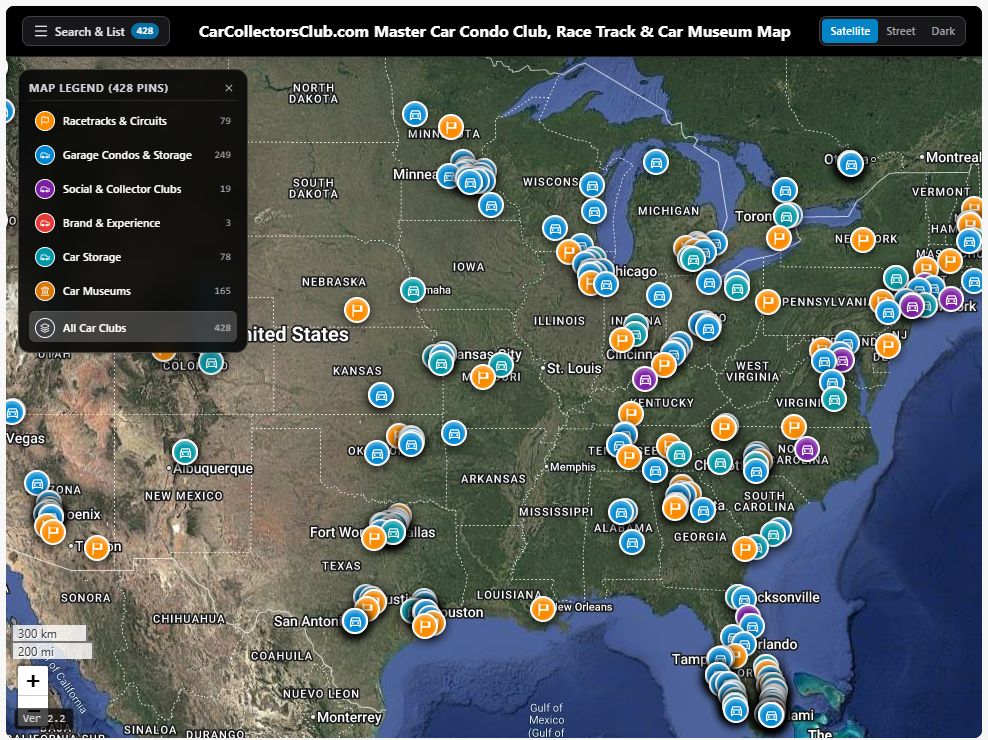
I created this prototype in Google AI Studio to bring 605 automotive destinations into one searchable, interactive geographic experience, including 428 car clubs, tracks, storage facilities, and related locations plus 177 automotive museums.

Built with React 19, TypeScript, Leaflet, Tailwind CSS, Vite, and Lucide React, the application uses Gemini and the Google Gen AI SDK for AI-assisted address parsing and geocoding. Esri ArcGIS, OpenStreetMap, CartoDB, and OpenTopoMap provide multiple basemap options, while the structured TypeScript datasets are managed through GitHub and the application is deployed on Vercel.

Interactive automotive map showing car clubs, tracks, garage communities, and museums across North America
Interactive map experience combining structured automotive location data, category filtering, AI-assisted geocoding, and multiple geographic basemaps.

Built & Deployed With

  • React
  • TypeScript
  • Leaflet
  • Tailwind CSS
  • Gemini
  • Google Gen AI SDK
  • AI-Assisted Geocoding
  • Vite
  • GitHub
  • Vercel

09 · Professional Approach

From Business Need to Working AI Solution

I start with the business problem, map the process, identify where AI and automation can create practical value, and connect the right data, tools, and systems into a solution that is useful in day-to-day operations and practical to maintain.

Strategy · Process design · AI integration · Automation · Data systems · Delivery

10 · Tools & Platforms

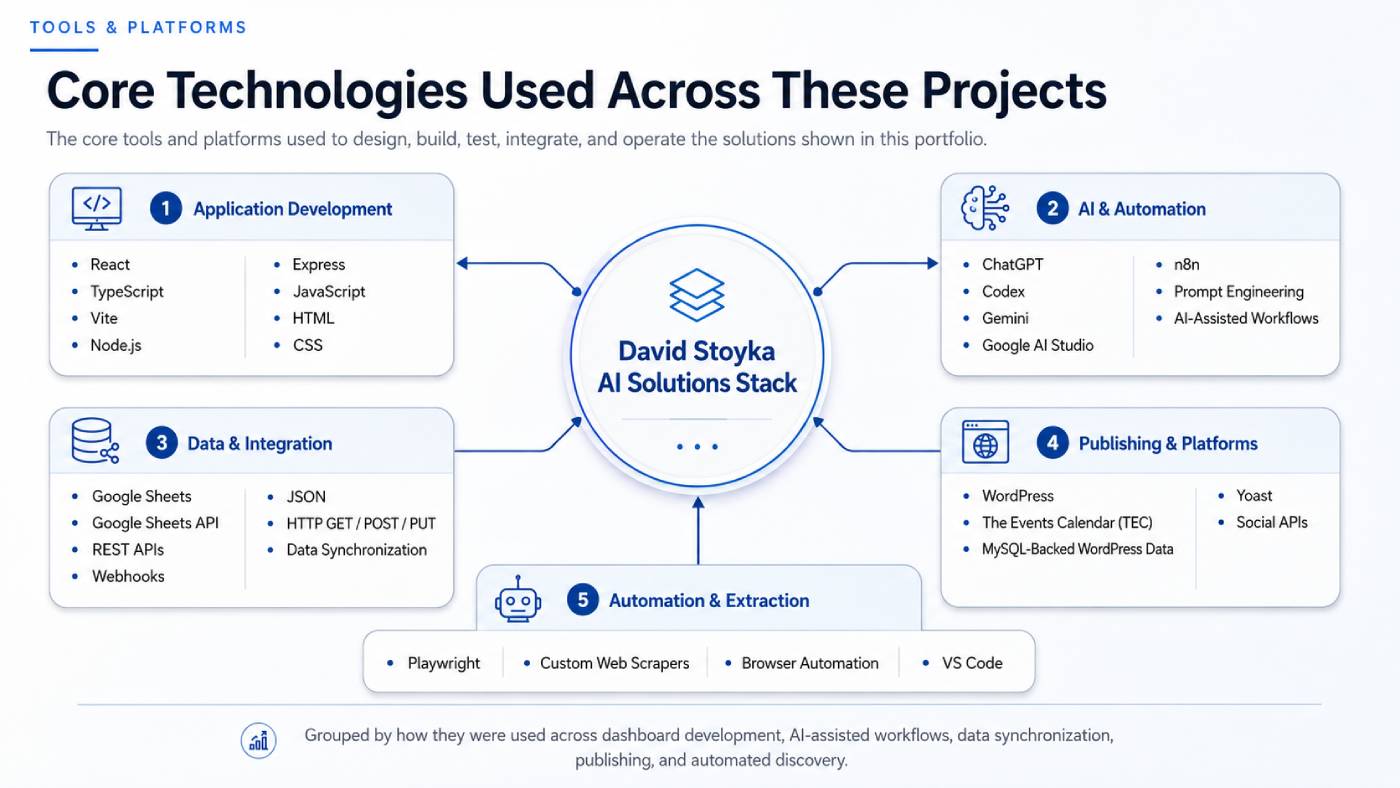
Core Technologies Used Across These Projects

These are the core tools and platforms I used to design, build, test, integrate, and operate the applications, automation workflows, data systems, and publishing solutions shown throughout this portfolio.

Core technologies grouped by application development, AI and automation, data integration, publishing, and extraction
Technology stack used across the portfolio — grouped by application development, AI and automation, data integration, publishing platforms, and automated extraction.

Application Development

AI & Automation

Data & Integration

Publishing & Platforms

Automation & Extraction

The technologies above are not presented as isolated skills — they are the tools used to build and operate the working solutions demonstrated throughout this portfolio.

Add Event interface

Enlarged Add New Event interface with structured event fields